






Invisible Executive
Make yourself invisible to hackers and surveillance, even on compromised devices and unsecured networks.
Essential protection for accessing privileged accounts, confidential communications, and financial systems – especially when traveling.
Take control of your own cybersecurity instantly. No software. No setup.
You can’t hack something that doesn’t exist
How can you tell if your computer is hacked?
You can’t.
Assume Your Device and Network are Already Breached
-
▸ 99% of cyber-attacks target end-user devices—...laptops and smartphones. The goal is identity theft: to capture your credentials to online services and take over your accounts—to steal money, redirect transactions, or hold you to ransom. Executives are 40x more likely to be targeted by sophisticated spear-phishing attacks.
-
▸ Using your phone as a hotspot while abroad...with global roaming doesn’t secure you—your connection passes through local telcos that track your activity, posing significant risks in high surveillance regions.
-
▸ VPNs stop nothing—they’re just a tunnel...and everything comes through it. Malware, phishing links, and malicious scripts execute on your device, enabling credential theft and account takeovers.
-
▸ You really can't trust your device. AI companions...now embedded—see what you see, hear what you hear, know what you know. Client-side scanning on Apple, Microsoft, and Google devices monitors everything. You don't control what your own system reports, or who sees it.
-
▸ 2FA is frequently defeated, with app-based...codes intercepted by a Man-in-the-Browser (MitB) and SMS codes stolen via telco exploits. When your device is compromised and the attacker has your passwords—say, your bank account—they are just one step from tricking you into revealing your second factor. 2FA alone is not enough to stop modern attacks.
-
▸ But they don’t need your credentials if they...hijack your session. Malware like RedLine Stealer, APT campaigns, and Man-in-the-Browser attacks extract session cookies and reuse them from another device—impersonating you in real time to access corporate systems, approve transactions, or exfiltrate sensitive information.
-
▸ When your own device can't be trusted, what can?
Become Invisible to Hackers-Even on Infected Devices
-
▸ VanishingPoint's internet isolation Fortified VPN...products (Everyday-WebSafe and Pro-SafeWindow)—build temporary, pristine virtual machines in the cloud instantly. Invisible from the internet and completely isolated from your device, they create a secure environment for shielding board materials and sensitive corporate data from malware, tracking, and session hijacking.
-
▸ This breakthrough, called Internet Isolation...is used by financial institutions, law firms, and trust companies to secure high-value transactions. It provides a hardened security foundation for executives accessing board materials, financial platforms, and privileged systems across untrusted or compromised networks.
-
▸ The Fortified VPN streams an image of the...remote desktop to your browser over an encrypted connection (VDI). This stream of pixels carries no code, so malware can't reach your device. Access board materials, financial systems, and privileged communications without risk of surveillance or compromise.
-
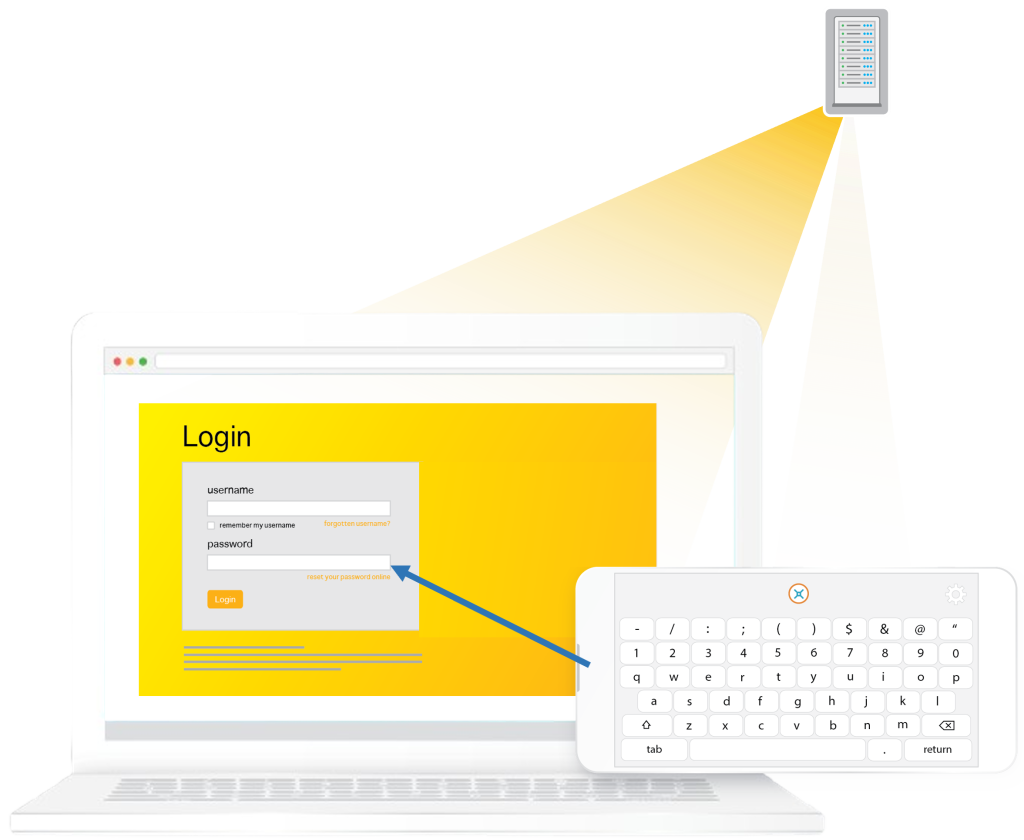
▸ Enter passwords using an invisible encrypted...keyboard on your phone—an illusion that keeps credentials off your computer entirely. This defeats keyloggers and Man-in-the-Browser (MitB) attacks, protecting access to banking and financial systems, administrative logins, and corporate platforms—even if your device is compromised.
-
▸ Neutralize session cookie hijacking—used by...malware like RedLine Stealer, MitB, and APT campaigns—by streaming a graphical proxy of the remote session to your browser. Malware on your device has no interface to intercept, inject, or manipulate—there’s no surface to exploit. Access board materials, approve transactions, and conduct high-level communications without compromise—even if your device is infected.
-
▸ Open suspicious links or email attachments...with complete immunity in a remote, disposable environment—blocking ransomware, malware, and fraudulent redirects before they can impact your device or organization's systems.
When you log out, the virtual machine evaporates without a trace—
ensuring you remain invisible to hackers and out of reach from malware on your device or network.
Trusted by Professionals Worldwide
I looked ‘under the hood’ at the underlying architecture of BankVault (now VanishingPoint) and came away impressed at how well the system maintains compartmentalised security for every individual user. Every time a user connects the system constructs a brand new virtual environment that is then completely destroyed when the user finishes their session. This ensures that all persistent threats are eliminated and that any, necessary software “patches” are applied at each new login. Overall, it’s a very impressive solution to a very common and expensive problem. This is the reason behind my decision to use the product and invest in the company.
“I train and help people to protect their digital assets against scams, phishing and the mistakes that cost people everything. But the threats I cannot train away are technical. We cannot trust our devices. Infostealer malware is invisible, and AI surveillance is now on virtually every device. My clients will never know if their laptop or phone is compromised. VanishingPoint solves this by simply sidestepping the device entirely. Nothing ever touches the device, and credentials are entered through an invisible encrypted keyboard. It is a simple and practical step I recommend to every client.”
Brett Looney
Principal Solutions Architect
Amazon Web Services
Dee Skillicorn
Founder, Digi-Secure.co
Crypto and digital asset security educator
Brian Bennett, Real Estate Agent
San Francisco
What is a Fortified VPN?
VPNs leave you exposed with email attachments, websites, and JavaScript still executing on your device.
Fortified VPNs go much further – encrypting traffic and isolating activity in a secure, remote environment.
VanishingPoint’s Fortified VPN allows you to open emails, click links, and browse freely – no code ever touches your device.
Each session is pristine, disposable, and immune to threats like keyloggers and man-in-the-browser attacks.
| Feature | Standard VPN | Fortified VPN (VanishingPoint) |
|---|---|---|
| • Encrypts internet traffic | ✅ Yes | ✅ Yes |
| • Bypasses Geo-Blocking with a different IP address | ✅ Yes | ✅ Yes |
| • Blocks malware (email attachments, web links, etc) | ❌ No | ✅ Yes (complete immunity) |
| • Pristine environment every login | ❌ No | ✅ Yes (disposed on logout) |
| • Isolates browsing from your local device | ❌ No | ✅ Yes |
| • Sidesteps Man-in-the-Browser (MitB) attacks | ❌ No | ✅ Yes (eliminated at logout) |
| • Sidesteps keyloggers intercepting passwords | ❌ No | ✅ Yes (invisible encrypted keyboard) |
Fortified VPNs create a truely isolated environment – no malware, no trackers, no compromises
Choose Your Plan
Keep nothing, or store data only your phone can decrypt.
Runs in your browser, nothing to install.
Credentials and recovery phrases typed on an Invisible Encrypted Keyboard never touch your device.
LITE
- 1-hour sessions | 5-min inactivity logout
- Limited to 20 hours / month
- Standard compute
- Temporary file storage during session
- File Import (No Export)
- Essential apps for browsing and images
- Software wallets, browser and desktop
PRO
- 8-hour sessions | No inactivity logout
- Unlimited hours
- 2x compute (CPU and RAM) (v2.1)
- Temporary file storage during session
- File Import and Export
- Adds office and productivity apps
- Adds hardware wallet support (v2.1)
ULTRA
- 24-hour sessions | No inactivity logout
- Unlimited hours
- 2x compute (CPU and RAM) (v2.1)
- Permanent encrypted vault for files and keys
- File Import and Export
- Adds office and productivity apps
- Adds hardware wallets + air-gapped QR (v2.1)
- Shared deal rooms with other members (v2.2)
Test Drive?
Get a personalized demonstration with one of our security specialists who can address your specific executive protection needs.
Frequently Asked Questions
Every login builds a pristine virtual workspace in the cloud, isolated from your device and invisible from the internet. Your session runs there, not on your computer. What reaches your browser is a stream of pixels over an encrypted connection, not code, so malware on your device has nothing to intercept and no path to cross-infect.
Passwords and recovery phrases are typed on the Invisible Encrypted Keyboard, an illusion created on your phone’s browser by the remote virtual workspace. On a laptop or tablet, scan the QR code on the login screen. Keyloggers on your device, or on your phone, see nothing but asterisks and encoded data they can never decipher. The temporary encryption keys are never released by the virtual workspace.
The virtual workspace is destroyed at logout. What survives is your choice. (i) Temporary Workspace is built empty and keeps nothing. (ii) Your Workspace remembers your settings, favorites, history and browser plugins, held encrypted and opened with your phone. Factory Reset returns it to an empty machine at any time.
You can paste into the remote machine from your local clipboard, or type into it with the Invisible Encrypted Keyboard. You cannot paste out. For security, your local device cannot read the remote machine’s clipboard. Files transfer both ways, depending on your plan.
A traditional VPN only encrypts your internet traffic. It does not stop malware, phishing, or keyloggers on your device. A Fortified VPN, means:
✔ You work inside a disposable, remote machine, not your own device.
✔ Your activity is isolated from your device, so malware on it cannot can access your session.
✔ Keyloggers and MitB attacks are defeated because credentials never pass through your local device.
99% of cyber attacks target end user devices. VanishingPoint assumes yours is already compromised. Your session runs on a remote machine and your credentials are typed on the Invisible Encrypted Keyboard, so nothing sensitive touches your local machine.
✔ Keyloggers. Passwords are never typed into your device, so keyloggers have nothing to capture.
✔ Man-in-the-Browser. Your session runs in the remote browser. An attack on your local browser has no session to intercept.
✔ Infostealers. Credentials, cookies and session tokens stay inside the remote machine, out of reach of malware on your device.
✔ Phishing links and attachments. They open inside the disposable machine, not on your local computer.
✔ Ransomware. Nothing you open in a remote session can reach your local files.
✔ Tracking. Your browsing activity is invisible to tracking on your device or local network.
Isolation cannot stop social engineering. If someone persuades you to type your credentials into a fake site, no technology prevents that.
That is your choice at every login.
Temporary Workspace stores nothing. When you log out or disconnect, the workspace is destroyed along with everything in it. No files, no cookies, no history.
Your Workspace remembers what you choose to keep: settings, favorites, history and plugins. Between sessions it is held encrypted on our servers. The key that opens it is held by MasterKey, BankVault’s patented passwordless MFA technology, in a decentralized protocol that releases it only when your phone initiates login. We store ciphertext. Nobody here can open it, and neither can an attacker who steals our storage. How it works is set out in Before Your Session.
While you are logged in, the workspace is open inside your remote machine so you can use it. Log out or disconnect and the machine is destroyed and the workspace returns to ciphertext.
Lose your phone and you re-enroll with your recovery code. There is no other way in, for you or for anyone else.
Factory Reset wipes Your Workspace back to an empty machine whenever you choose.
From v2.1, Proof-of-Presence adds a further check: your workspace decrypts only when you and your phone are present together.
Not by us, and not where we can read it.
You type it on the Invisible Encrypted Keyboard. Each keystroke is encrypted on your phone and decrypted only inside the remote machine, where your wallet software uses it. It never passes through your computer, and it never lands on your device.
In Temporary Workspace it is destroyed with the machine when you log out. In Your Workspace, if a wallet extension you installed keeps keys, they may be held encrypted like everything else there, and only your phone can decrypt them.
For a wallet recovery you will not repeat, use Temporary Workspace.
No, and what matters more is that we cannot open what you leave behind.
Between sessions your workspace is ciphertext. The key that opens it sits in MasterKey, held in a decentralized protocol that releases it only when your phone initiates login. Nobody here can read your data, whether by curiosity, by mistake, or under instruction. That is a property of the design, not a policy.
While you are logged in, your session runs on a machine we host, as with any hosted service. The stream between that machine and your browser is encrypted. The Invisible Encrypted Keyboard encrypts each keystroke on your phone and decrypts it only inside the machine, so a password is readable in exactly one place. Our staff do not watch sessions and have no console into a running machine.
We host on AWS, Google Cloud, Equinix and OVHcloud, the same providers the major banks now trust with their own systems.
We can only hand over what we hold. Our storage holds your workspace and its data key, both as ciphertext. The key that opens them sits in MasterKey, in a decentralized protocol that will not release it without your phone initating the process. An attacker who copies our storage gets ciphertext. A court order gets ciphertext. Neither gets a usable key, because no single system holds one.
Temporary Workspace leaves nothing to hand over at all.
To re-enroll a new phone, a link is sent to the email address you signed up with. You then enter your secret recovery code on the Invisible Encrypted Keyboard, and your access is rebuilt. There is no other way in, for you or anyone else. Without both, Your Workspace cannot be recovered, by you or by us.
Keep the recovery code somewhere that is not your phone.
From v2.1, Passkeys let you enroll additional backup devices, each requiring your Proof-of-Presence.
It runs in a browser, so it opens on any device with nothing to install. But it is a full desktop, built for a desktop or laptop screen. A phone screen is too small to work in.
Your phone is the second device. It logs you in and becomes the Invisible Encrypted Keyboard. Every session needs both.
The computer can be your own, a borrowed one, or one you do not trust. Nothing from the session touches it. It can even run on an internet TV, with the phone as a real keyboard instead of the one on the remote.
Files move into your session on every plan by drag-and-drop. What moves out depends on your plan.
- LITE: drag and drop files into the remote workspace. Nothing downloads back to your device. Print, and the session hands a PDF back to your device. Or email a document to yourself from inside the session.
- PRO: drag and drop files in. Click, select download, and they come back to your device.
- ULTRA: upload and download as on PRO, plus a permanent encrypted vault for your files. From v2.2, share it with other users.
On every plan the clipboard is one-way. Paste in, not out. No software to install on any plan.
Version 2.1, the next release.
PRO and ULTRA gain hardware wallet support over USB for Ledger Live, Trezor Suite, Blockstream Green and BitBoxApp.
ULTRA also gains an air-gapped path: your wallet’s QR code is read through your camera and never connects to the session by cable.
Software wallets run today on every plan.
If you’re concerned about network sniffing, or firewalls throttling or blocking the internet, then travelers will find their mobile’s global roaming provides clear internet. The remote virtual machine sets up an encrypted connection with your devices browser, equivalent to a VPN. You then conduct your work on the remote virtual machine. Providing you use the invisible encrypted keyboard (on desktops by scanning the QR code) then there is no single attack surface to intecept making it incredibly difficult to compromise. On mobiles the invisible encrypted keyboard is there by default. On password fields it steps up security further by slightly shuffling the keyboard characters left or right. The background changes to red to alert the user that the keyboard has changed slightly to protect them.
Yes, as long as your company allows remote logins. Many professionals use VanishingPoint to securely access corporate portals, email accounts, and cloud-based services while traveling.
We have Remote Desktop Protocol (RDP) for secure access to Microsoft Terminal Servers, and x3270 for accessing IBM Mainframes.
No. This internet isolation technology operates remotely in the cloud, so your browsing experience depends on your connection. If you have good internet, it runs smoothly. In some cases, pages may even load faster because it eliminates background tracking and malware that slow devices down.
We host across our own physical infrastructure and multiple cloud providers: AWS, Google Cloud, Equinix and OVHcloud. You connect to the closest node automatically. Choosing your own location returns in v2.2.
Workspaces run Linux, built by us from a hardened, immutable image. There is no shell and no way to install software. You cannot reach anything beyond the applications provided, and every login builds a pristine new workspace, invisible from the internet.
No organization or technology can ever guarantee the integrity of a laptop or smartphone, because every device carries different components, firmware, applications and history. In contrast, VanishingPoint is built to stringent technical standards on transparent, stable long-term-support open source releases, vetted and approved by the industry. No experimental code. Every workspace, when built, is identical.
Once you have purchased a plan:
1️⃣ In the very top bar of this website, click Login. A new page appears with a QR code.
2️⃣ Choose either (i) Temporary Workspace or (ii) Your Workspace, then scan it with your phone and tap to confirm login.
3️⃣ When your session begins, scan the QR code on screen to pair your phone and open the Invisible Encrypted Keyboard.
Your phone was enrolled when you first signed up: you scanned a QR code and set your email and a secret recovery code. Every login from then on is passwordless, with Multi-Factor Authentication in one step, not two. No password to type, no email link to click, no code to copy across.
Before your first session, read Important – Before Your Session. It covers what the protection does and where it ends.
Invisible to Hackers
Completely sidesteps
your local device and
all possible malware.
Absolute Incognito
Complete Privacy
Access Facebook and
personal email securely through a work computer.
Ransomware & Virus protection
Secure Banking
Access financial platforms
and online service with
absolute security.
Crypto-wallets
Stay Secure from Hackers and Immune from Threats
VanishingPoint is your personal broad-spectrum cyber solutions, based on Internet Isolation and Fortified VPN technologies. It protects not just your data, but your company’s reputation and stakeholder trust.
- Use it to maintain business continuity by preventing credential theft and account takeovers when accessing banking, financial platforms, or corporate systems.
- Access emails and hyperlinks or open potentially hazardous files with complete immunity using a temporary, remote, disposable machine.
- Whether using public WiFi in an airport or conference, sharing the computer lab, or accessing your bank from the computer at work, VanishingPoint lets you do so with zero footprint and leaving no breadcrumbs.
Start now, and take control of your own security.
BankVault: The Deep-Tech Engine Behind VanishingPoint
VanishingPoint is a brand of BankVault cybersecurity, a deep-tech innovation team pioneering intelligent new approaches to web security.
BankVault holds 15 granted patents worldwide and is backed by Turing Laureate Whitfield Diffie, co-inventor of public-key cryptography, as shareholder and advisor. The company was selected as one of the world’s Top 60 Deep-Tech Startups, Top 1% of 6,800 companies, by Enterprise Singapore at SLINGSHOT 2025. A newly granted U.S. patent protecting MasterKey’s core innovation further underscores the technical depth of the platform.
Its first-generation Internet Isolation and Fortified VPN products launched in 2015 to secure high-value online financial transactions, from trust accounts to treasury funds worth millions. Five generations later, that technology has evolved into VanishingPoint, designed for executives, investors, family offices and cryptocurrency holders who need to be secure from hackers and surveillance, even on compromised devices and unsecured networks, especially while traveling.
BankVault operates from San Francisco, Silicon Valley and Perth, Western Australia.