Log in with a tap. Open your browser with a click. Your email, messaging, accounting, Facebook, and anything else you had open appear as you last left them. Your bookmarks, your plugins, your password manager, your wallet, all where you put them. Nothing typed.
The credentials never touch your computer. They live in a machine that your computer cannot reach, and that only your phone can open.
v1 gave you a clean machine every time. v2 gives you your machine every time, still isolated. Every session on v1 began from nothing, minutes of setup before any work started. On v2 there is no setup. You open where you left off.
That moves it from something you reach for on a high risk day to something you can work in daily. v1 reached people who already knew they were a target. v2 reaches everyone who wants a workspace of their own. There whenever you come back. Outside your laptop, outside your company network.
A machine you work in every day earns its place, and that’s the one you keep.
What’s changed in v2
v1 forgot everything by design. Nothing persisted, so nothing could be taken. It worked, won numerous international awards, and did what no other Internet Isolation technology could: put it in the hands of an individual, with no software or setup.
You kept asking for an easier way.
v2 solves this without compromising security. A pristine new machine is built for every session, with your settings, favorites and history restored into it. Files, printing and your clipboard now move between that machine and your own, and everything stays beyond the reach of malware on your device or surveillance on unsecured networks.
Now it remembers you
Every session still starts with a new machine. Your encrypted workspace follows you into it.
It opens where you left off, with your history, settings and favorites.
Your open tabs return as well, once you set the browser to restore your last session. Instructions are on the Before Your Session page.
If you left your Google account logged in, it is still there when you return.
Install the browser plugins you actually use. They are still there next session. Your own password manager, for example: Bitwarden, 1Password, LastPass, Dashlane.
Need the v1 temporary workspace? Select that before login. It’s pristine and gone when you leave.
Factory Reset your workspace to an empty desktop at any time.
Enterprise isolation platforms can take tens of minutes to stand up a machine. We do it on demand. That is what makes Internet Isolation practical for an individual.
One desk, two machines
v1 kept the two machines completely apart. v2 lets them work together, and controls the direction.
The Invisible Encrypted Keyboard has evolved. More keys and a mousepad now control the whole machine. No app to install.
Drag files up from your local desktop.
Download files back from the remote machine. PRO and ULTRA plans only.
Print anything and a PDF lands on your local machine.
Copy from your local machine and paste into the remote session. E.g. From a password manager.
The reverse is blocked by design, so recovery phrases and private keys cannot be lifted from the remote clipboard.
No password, two devices, one tap
v2 remembers you. So proving it’s you now matters more. MasterKey, optional on v1, is mandatory on v2.
MasterKey provides Invisible Passwordless MFA. No software or setup. Scan to pair, tap to log in.
The attack surface is split across different devices and factors. Compromising one is not enough.
Anti-hijacking. Stolen session cookies replayed on another device cannot hijack your session. Re-authentication is required from your phone. Further details in Before Your Session.
Network Resilience and Recovery keeps your session alive through dropouts, so you don’t lose your work. You log in and tap again to resume it, which is one of the steps that stops anyone else resuming it.
Invisible Crypto Wallet
Hardware wallet security with online wallet convenience. Essential protection for accessing your crypto wallets, exchanges, and banking.
Run the software wallets you already use. Install their browser extensions in your workspace.
Hardware wallet support arrives in v2.1 on PRO and ULTRA. Ledger Live, Trezor Suite, Blockstream Green and BitBoxApp.
Recover your wallet inside a pristine machine, invisible from the internet. Enter your 12-24 word seed phrase on the Invisible Encrypted Keyboard, an illusion on your phone that only the remote machine can decipher. There is no single attack surface.
Enter exchange and bank passwords the same way, sidestepping keyloggers.
Stolen crypto is gone forever. No chargebacks, no insurance, no recovery. You can’t hack something that doesn’t exist.
Every plugin can watch every tab, on your machine and ours
Browsers are built to let a plugin see every tab you have open. That is not a flaw in any one browser. It is how the technology was designed, and it is true on your own machine right now.
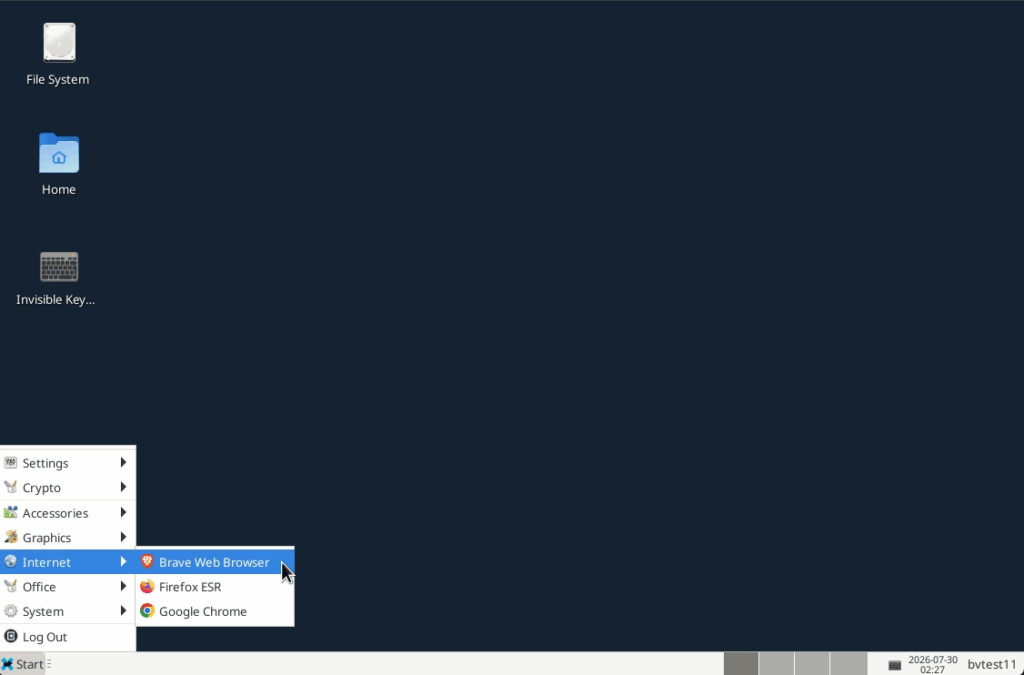
VanishingPoint currently gives you Chrome, Firefox and Brave, so the same rule applies inside your session. A plugin you install stays there and can read everything you do in that browser: your exchange, your bank, all of it.
We recommend not installing plugins at all. You have the freedom to do it. Only install what you trust, and know that a plugin which is safe today can change hands tomorrow.
A workspace that remembers you also accumulates baggage. Reset and you’re back to a pristine machine, carrying no plugin from the sessions before it. Sync will reinstall whatever is still in your browser account, so remove what you no longer trust there first, then reset.
Activate your v2 account
v2 does not behave like v1. Read this before you log into anything that matters.
Your v2 account runs from your Stripe subscription, so that needs to be in place first.
If you signed up after 1 July 2025: Follow the steps below to activate your v2 account.
If you signed up before this: We’ll email you a link to create your Stripe account. Then follow the steps below.
Your v1 login keeps working until we retire the old system. You can move at your own pace.
Step 1
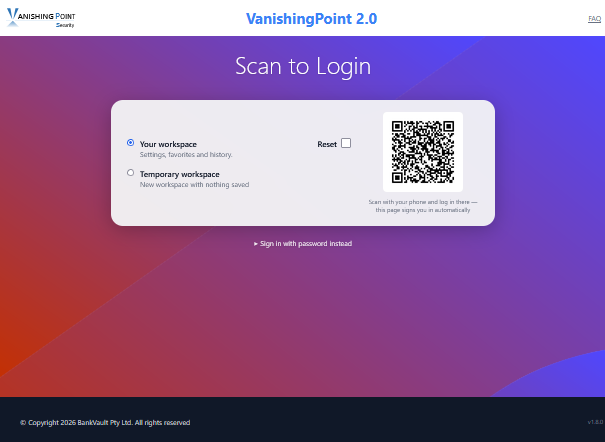
Click “VanishingPoint 2 Login” at the top of the page.
iPhone: Turn Safari Private Browsing OFF *
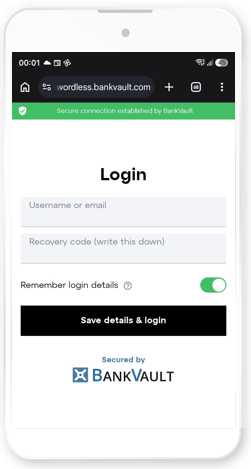
Scan the QR code with your phone and a login page opens in your phone’s browser.
Choose a recovery code and store it securely. 8+ characters, upper / lowercase, numbers. It is one of the factors that you will need to recover your account if you lose access.
* Safari Private Browsing does less than most people think. It does not hide your IP address, stop websites tracking you, or hide anything from your network or internet provider. What it does is drop the session cookies and stored data your browser normally reuses, which makes everyday browsing awkward. VanishingPoint uses your browser, and Safari Private Browsing breaks this, so your next login fails. Turn it off, or use another browser. Want real anonymity from website tracking? A VanishingPoint Temporary Workspace gives you a clean session every time.
Step 2
On your phone:
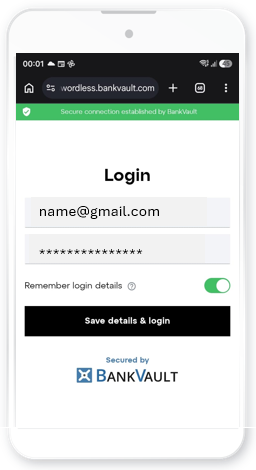
1. Enter your existing username or email.
2 Enter your new recovery code. ** Press [Save details and login].
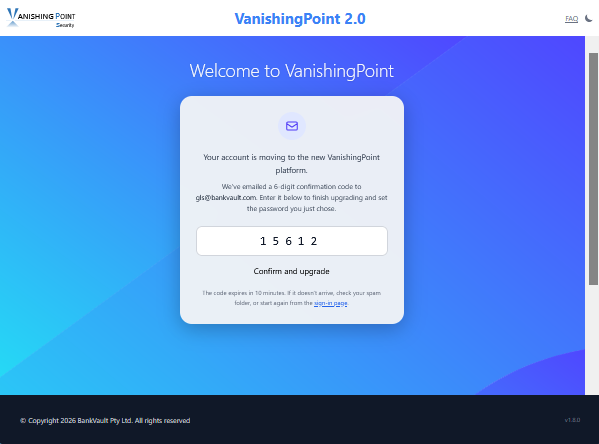
Your laptop page asks for a confirmation code.
Check your inbox for a 6 digit confirmation code from VanishingPoint. Enter this code to complete your upgrade.
** Your recovery code is entered with patented MasterKey technology: invisible passwordless authentication. The Invisible Encrypted Keyboard on your phone is an illusion. Your keystrokes never touch your devices. What actually happens is a handshake that does two things. It logs you in. And it produces the encryption keys that unlock your private workspace: your browser logins, history, plugins, and any data you chose to keep.
Step 3
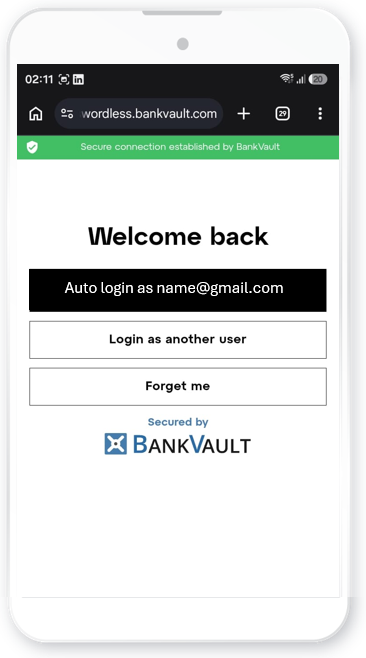
Next time you log in: Scan, then tap.
Passwordless multi-factor authentication in one step. It logs you in. And if you chose to keep your workspace, it decrypts and rebuilds it exactly as you left it: your logins, your history, your plugins.